
All configurations discussed in the following chapters are guidelines based on our internal tests and are subject to changes at any time without prior notice.
We cannot guarantee that these guidelines will work for all individual user requirements.
ToolsOnAir and its worldwide partners provide support and help during this phase but are not responsible for errors and/or failures that may occur due to incorrect setups or insufficient testing.
ToolsOnAir and its global partners offer support and assistance during the setup phase, but are not liable for any errors or failures resulting from incorrect configurations not carried out by them or inadequate testing performed by the End User.
Hardware setup(s), third-party drivers, software and operating systems must always be tested thoroughly with the current trial version, provided free of charge by ToolsOnAir prior to the final deployment.
Compatibility Matrix
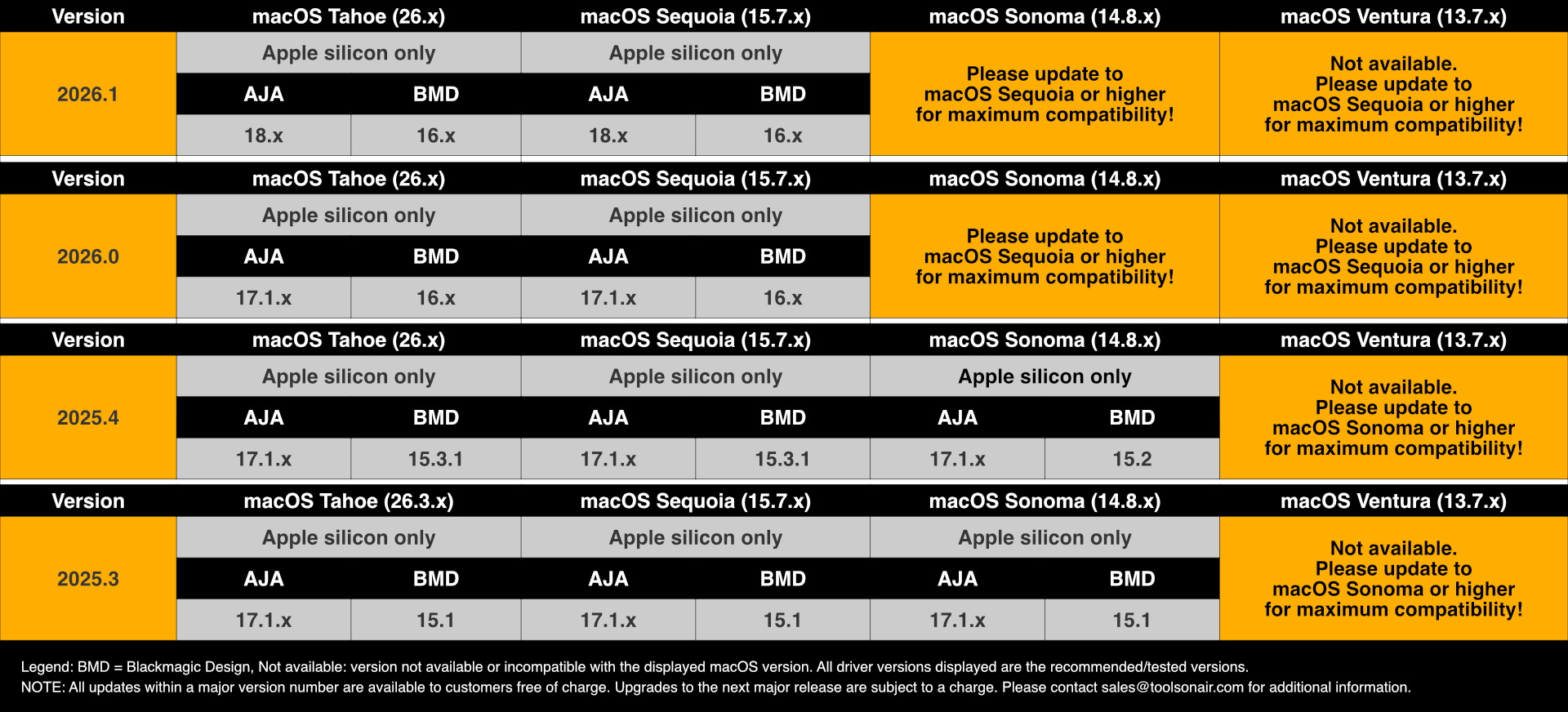
Hardware & Software Requirements
Macintosh Model | Apple silicon based Mac Pro, Mac mini, Mac Studio, iMac1 , MacBook Pro1 or MacBook Air1. |
|---|---|
RAM | 8GB minimum, 16 GB or better recommended. |
GPU | Apple silicon GPU. Refer to chapter Supported GPUs for further information. |
Operating System | macOS Sequoia (15.7.x) and macOS Tahoe (26.4.x) are recommended. macOS Sonoma (14.8.x): please update to macOS Sequoia or higher! |
Video Devices | AJA and Blackmagic Design video devices are supported. Refer to chapter Supported Video Devices for further information. |
Optional | Sonnet xMac mini Server (with TB 3 connectors), Sonnet DuoModo Rackmount/Desktop systems, Sonnet Echo models: Echo SE I T5, Echo II DV, Echo II DV T5, Echo III, Echo Express SE I, SE IIIe, SEL, either with TB 3/4 or TB 5 connections. |
1 Testing only. When using a Mac with a switchable graphics card, make sure to deselect the “Automatic graphics switching” option in the “Energy Saver” or “Battery” system preference pane or window.
An active network connection is mandatory and has to be configured and activated before the Just Play Lite application can be started.