
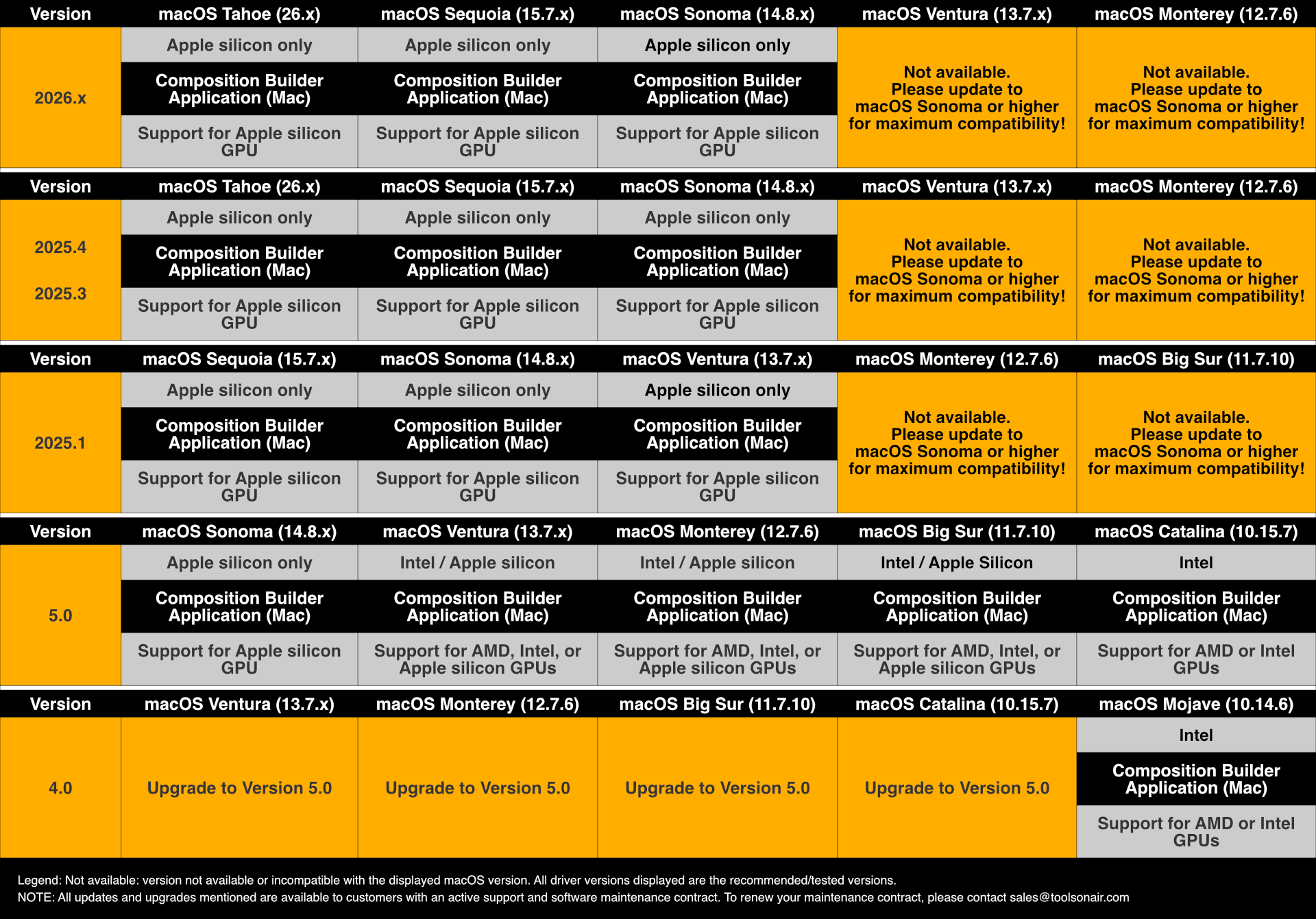
Starting with version 2025.1, the Composition Builder application for macOS will be optimized exclusively for Apple silicon hardware (M1-M5) to provide you with the best performance and experience.
If you are planning to use the Composition Builder application on INTEL-based Macs (MacPro7,1 or Macmini8,1) please use version 5.0! and contact the ToolsOnAir staff (sales@toolsonair.com) for more information. Nevertheless, we will, of course, continue to support our customers who still have certified Intel-based Macs running qualified versions of Composition Builder v.5.0.Apple silicon: macOS Sonoma (14.8.x), macOS Sequoia (15.7.x) and macOS Tahoe (26.4.x-recommended)
A screen resolution of at least 1920×1080 pixels.
Make sure to test the final composition on a system which is equal to the system which is used to run the Just Out engine application. Depending on the CPU, GPU, and storage system used for Playout, you will be able to play more or less complex compositions. It is therefore highly recommended to check the real-time composition(s)created with the Composition Builder application against the production On Air machine to prevent possible issues while broadcasting.