
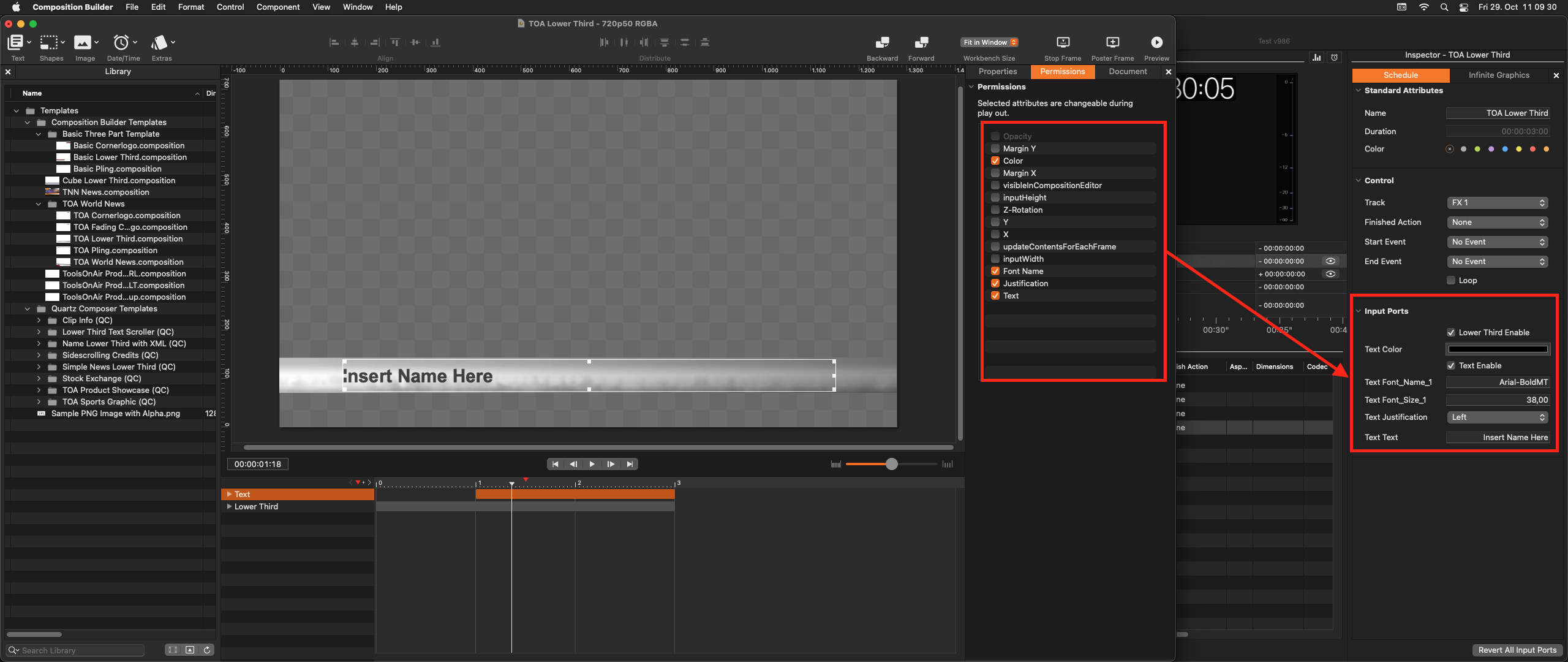
Permissions are used to publish attributes of components to the Just Play Pro 202x or Just Live Pro 202x user interface. In simple words, this means you can specify which attributes of a component will be modifiable in the Inspector of Just Play Pro 202x/Just Live Pro 202x, for example, the text of a lower third. This ensures that you can dynamically change the displayed content of a graphic template.
How to Publish Attributes
Select the Component whose “Permissions” you would like to change.
Switch to the “Permissions” tab.
Activate the checkbox in front of the attributes you would like to have visible in the Inspector of Just Play Pro 202x/Just Live Pro 202x.
Launch either Just Live Pro 202x or Just Play Pro 202x.
Add the composition created with the Composition Builder application to the Workbench (or Rundown).
Select the composition to see the attributes in the Inspector.