
You are welcome to download the provided Metadata Examples as a point of reference. These examples can be utilised to gain an understanding of the potential applications of Metadata Sets.
The Metadata Examples provided are:
Selected European Soccer Leagues 2023-2024 (UK, DE, FR, IT, SP)
UEFA EURO 2024
UEFA WOMEN EURO 2025-SWITZERLAND
FIFA CLUB WORLD CUP 2025-USA
US Sports 2022 (NFL, NBA, MLB, NHL, MLS)
FIFA World Cup 2026 (CAN, MEX, USA):
Once unzipped, follow the Add Metadata Set guide here:
Add a new Metadata Set v.2026.x
Just Control
In Just Control select the desired Metadata Set and details
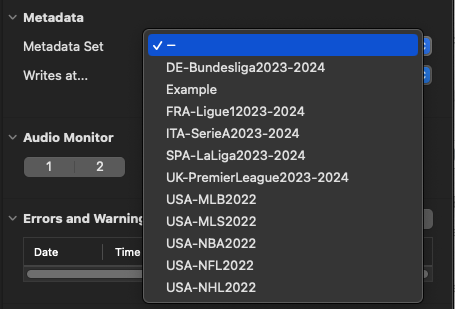
and the Details such as “Home”, “Away Team”, “Referee”, “Stadium” etc. where available.
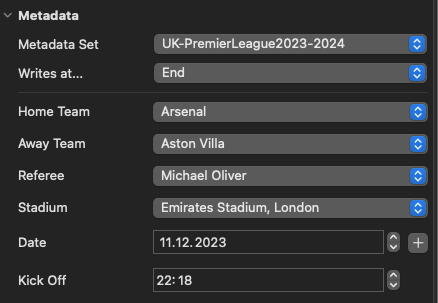
Finally press the Recording button for the selected Channel. Once the Recording has been completed, an Export XML file will be generated, showing the metadata selected previously.
<?xml version="1.0" encoding="UTF-8" ?>

<file name="UKTEST_Channel1.mov" path="/Users/mgrund/Movies/Ingest/UKTEST_Channel1.mov">

<homeTeam>Arsenal</homeTeam>

<awayTeam>Aston Villa</awayTeam>

<referee>Michael Oliver</referee>

<stadium>Emirates Stadium, London</stadium>

<date>Monday, 11. December 2023</date>

<kickoff>22:18:10 Central European Standard Time</kickoff>

</file>
The example data provided in these documents is provided “as is” and may contain inaccuracies or typographical errors. While every precaution has been taken in the preparation of these documents to ensure that they contain accurate and up-to-date information, TOA assumes no responsibility for errors or omissions.